
Autopilot runs automatically and does not need any human intervention to generate AI outputs. We have made autopilot available for Rotoscoping on Slapshot.
How to Use Autopilot
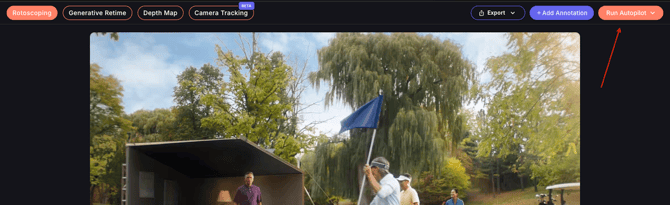
- Open Rotoscoping mode in Slapshot.
- Click the Run Autopilot button. (Available on the top right)
- Autopilot mode will immediately start generating predictions.
That’s it. No additional setup is needed.
What does Autopilot do
- Automatically detects objects in your shots
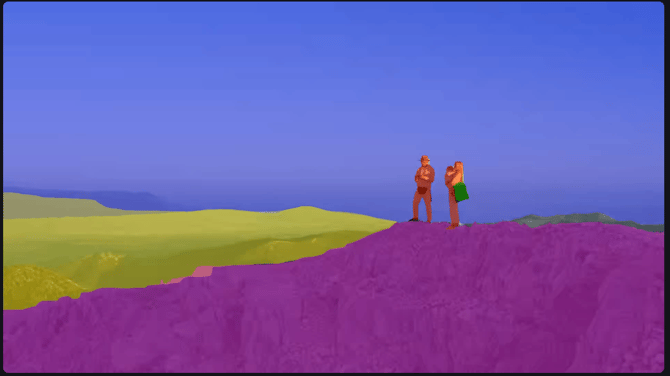
- Generates mattes for each identified object
- Creates a preview output so you can review the results . The preview will be generated for the first 100 frames of your shot and can be played.
An example of Autopilot's output presented in individual layers is shown below.
Exporting your output files:
You can proceed to export the autopilot output by clicking on the `Export` button.
- The export process may take a bit of time as Autopilot will prepare all your layers for both Hard and Motion Blur mattes and prepare them as a Cryptomatte.
- You will receive a notification in the app and on email once the export is complete and ready to download.
Autopilot mode is an efficient way to segment shots automatically and work with flexible layers in your workflow.